

HDS GOA proper till.
Free.
The same HDS till our paying customers use, free for small cafés, coffee carts, pop-ups, market stalls, shops and new businesses. Up to 50 menu items, cash and card on your own card machine, and your daily sales report. Upgrade when you're ready.

A month, for as long as you like
No card needed to start and no time limit.
Menu items
In your own categories, with options and prices.
Take every payment
Card on any standalone card machine, recorded on the till as Manual.
Sales report
The transactions dashboard, end of day and the General sales report.
Free today. The whole platform when you need it.
HDS GO is the front door to HDS Cloud Apps. When you outgrow it, upgrading switches on everything below, on the same account, with nothing to set up again.
Unlimited items,
users and till points
Your whole team, each with their own login, staff PIN and permissions, and as many menu items as you like.
QR and mobile ordering
Mobile and table QR ordering.
Kitchen order board
Orders straight to a kitchen screen, plus a customer display.
Loyalty and gift cards
Part of the modules you can add.
Integrated card payments
The till sends the amount to the card machine.
Staff hours, rotas and payroll
Every report
Products, staff, VAT, voids, stock and more.
one platformSee them all ›
What's free, and what's next
HDS GO
Free planEverything you need to start selling.
- The HDS till, in Tablet or Classic layout
- Up to 50 menu items, with options and prices
- Cash
- Card on any standalone card machine, recorded as Manual
- One user and one till point
- Transactions dashboard, end of day and the General sales report
- Settings and My profile
- Kitchen order board
- QR and mobile ordering
- Staff hours, rotas and payroll
- Modules
Upgraded
The full platformEverything in HDS GO, and it all carries over. Plus:
- Unlimited menu items
- Integrated terminal: the till sends the amount to the card machine
- Unlimited users, each with their own login, staff PIN and permissions
- The Sales dashboard and every report: products, staff, VAT, voids, stock and more
- Kitchen order board, plus a customer display
- Mobile and table QR ordering
- Staff hours, rotas and payroll
- Modules: stock and procurement, running costs, ticketing, loyalty, gift cards and more
From form to first sale
Tell us about your business
Fill in the short form at the bottom of this page.
We call you
At the time that suits you, to talk through your till.
We set up your free account
HDS creates your HDS GO account for you.
Start selling
Add your menu and take your first payment. Upgrade whenever you're ready.
Upgrade when you're ready. Everything stays.
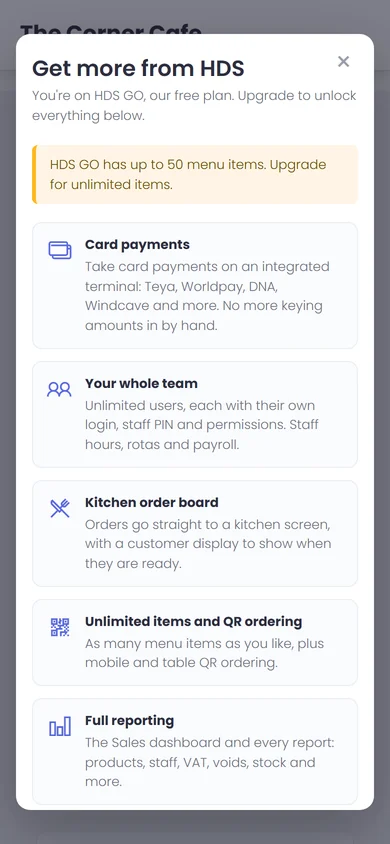
There is an Upgrade button in the header of every page. When you reach a limit, such as your 51st item, a second user or a report that isn't included, the upgrade window opens and explains why.
Choose Request an upgrade and HDS switches your account up. Your menu, sales history and settings carry over exactly as they are.
"The Corner Cafe" in these screenshots is made up for the demo.

Frequently Asked Questions
HDS GO Questions Answered
Is HDS GO really free?
Yes. There is no card needed and no time limit. You can use the free plan for as long as you like and upgrade only if and when you want more.
What card machine can I use?
Any standalone card machine. You take the payment on your card machine and record it on the till as Manual. To have the till send the amount to the card machine automatically, upgrade to an integrated terminal.
Can I add staff?
The free plan has one user and one till point. Upgrade when you want your whole team, each with their own login, staff PIN and permissions.
How many menu items can I have?
Up to 50 menu items, in your own categories, with options and prices. Upgrade for as many items as you like.
What happens to my data if I upgrade?
It all stays. Your menu, sales history and settings carry over exactly as they are. Upgrading just switches more on.
How do I upgrade?
There is an Upgrade button in the header of every page. When you reach a limit, such as your 51st item or a second user, the upgrade window opens and explains why. Choose Request an upgrade and HDS switches your account up.
How do I get HDS GO?
Fill in the form on this page and we will call you to set you up. The free account is created by HDS, not automatically.
Get HDS GO.
Free.
- No card needed, no time limit
- We call you and set up your account
- Upgrade any time, everything stays
Leave your details and we'll call you to create your free account. Prefer to talk now? Call 07856 435884.