
Order. Pay. Collect. No Queue, No Cashier.
A branded touchscreen kiosk with full item customisation, a built-in barcode scanner for grab-and-go items, and checkout through five integrated card payment gateways. Every order flows straight into the same live kitchen queue as your till — no separate system to watch. Available across the UK, Ireland, Malta, Spain and Gibraltar.

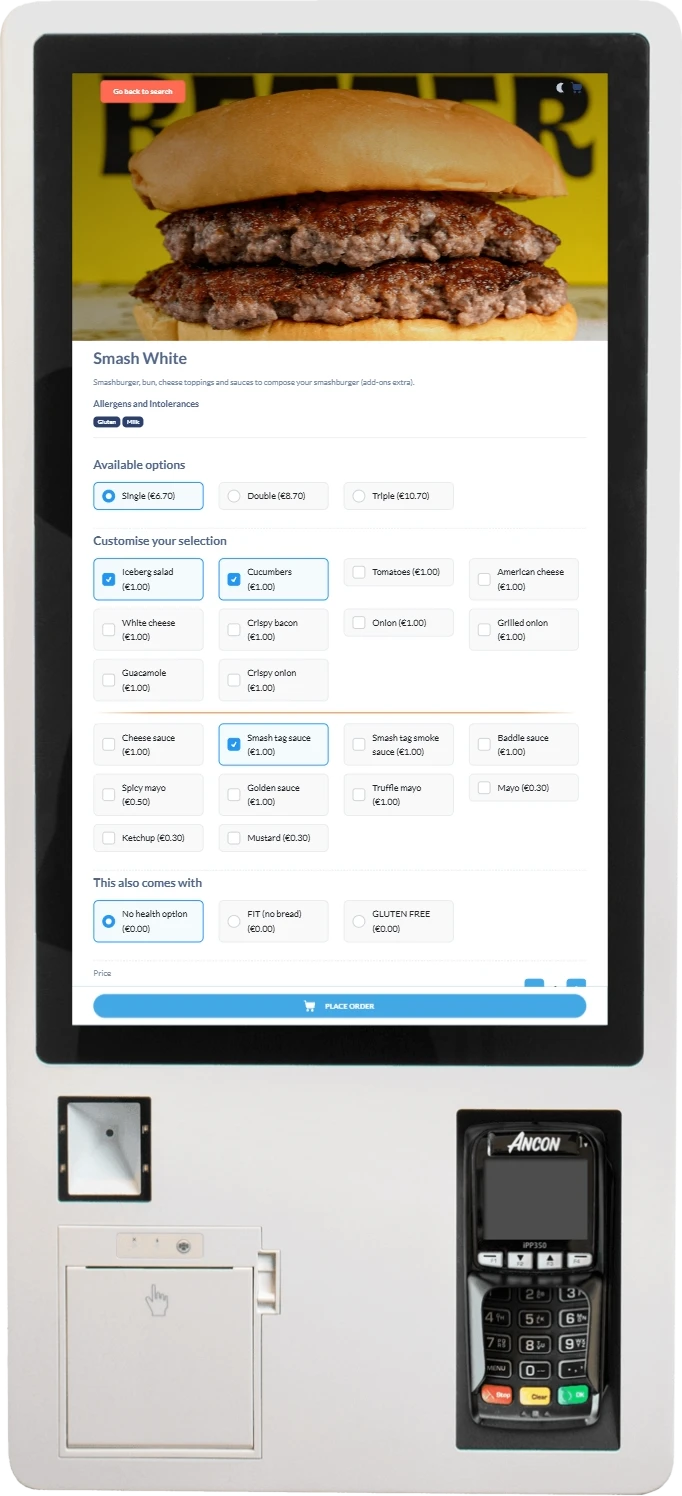
A Full Till, Without the Till Point
Self-Order, Fully Integrated
Not a bolt-on tablet — a kiosk that shares the same menu, stock and order pipeline as everything else on the platform.
integrated card payment gateways: Trust Payments, Payment Sense, NMI, Musqet and Viva Wallet.
cash accepted — the kiosk is card-only, with optional preloaded-balance or Bitcoin payment.
barcode scanner for adding packaged, grab-and-go items straight to the basket by scanning them.
is the starting price per kiosk, as an add-on to the base HDS Cloud Apps platform.
What's Physically On Every Kiosk
One Unit, Everything Built In
No separate scanner or card machine to source and cable up — it's one integrated unit.
The barcode scanner is a genuine laser/imager unit, not a camera — it reads a packaged item's barcode the same way a till-side scanner would, and posts the match straight into the customer's basket. It's what turns a made-to-order kiosk into a real self-checkout point for pre-packaged drinks, snacks or retail lines sitting alongside your hot menu, without a member of staff needing to ring anything through.
How It Actually Works
Built to Share, Not Sit Apart
The kiosk isn't a separate ordering system bolted alongside the till — it runs on the exact same data. A lot of kiosk software on the market is really a tablet-sized app that happens to sit near the till, syncing its own menu and its own order list on a delay. This one doesn't have a separate menu, a separate stock count or a separate order list to sync — because it isn't a separate system in the first place.
Same Menu-Assignment Mechanism
Each kiosk is assigned to a menu the same way a table or a mobile-ordering link is — so a kiosk can offer a different menu to the till, or to another kiosk on site, without a separate catalogue to maintain.
Live Stock Allocation
Stock is decremented in real time as each kiosk order is placed, against the exact same item catalogue and stock counts the rest of the platform reads from.
One Kitchen Queue
A kiosk order lands in the same live kitchen order queue as till and mobile orders, clearly tagged so staff can see at a glance where each order came from.
Local or Cloud Receipts
Print locally from the kiosk's own printer, or route through cloud printing — with an optional on-screen choice of no receipt, print, or email, if you want the customer to decide.
Grouped, Guided Customisation
Add-ons are separated from sauces, sauces from "no X" removals, with a visual divider between each group on screen — a display choice built specifically for a kiosk, where a customer is working alone with no one to ask if they get stuck partway through an order.
This shared-data approach is the whole point of running a kiosk on the same platform as your till, rather than as a separate ordering app: a menu change made once appears on the kiosk, the till and mobile ordering together; a sold-out item drops off the kiosk the moment stock hits zero, the same as it would at the till; and a busy kitchen sees one queue, not three — a kiosk order, a table order and a phone order all queue and print exactly the same way.
Straight Answers
What's On the Kiosk Today
No exaggeration — here's exactly what's live on the current kiosk, and what isn't (yet).
| Feature | Status |
|---|---|
| Card payment (5 gateways) | ✓ Included |
| Preloaded-balance ("tag") payment | ✓ Optional, per venue |
| Bitcoin payment | ✓ Optional, per venue |
| Cash payment | ✕ Not available |
| Full item customisation (options, add-ons, packages) | ✓ Included |
| Barcode scan-to-cart | ✓ Included |
| Live search & category browsing | ✓ Included |
| Idle-screen video loop | ✓ Available, per-kiosk setting |
| Multi-language ordering | ✕ Not yet — English only |
| Promo or voucher codes at the kiosk | ✕ Not yet available |
| On-screen loyalty offers | ✕ Not yet available |
| Local or cloud receipt printing | ✓ Included |
We'd rather tell you what a kiosk can't do yet than have you find out on launch day. If multi-language ordering, promo codes or loyalty offers at the kiosk matter for your site, talk to us — this list reflects what's live today, not what's on the roadmap. Where a feature is missing, it's usually because the kiosk deliberately keeps the customer's journey short and self-contained: no code to type in, no account to sign into, nothing that slows down a queue of people who just want to order, pay and collect.
Where We Operate
Self-Serve Kiosks Across the UK, Ireland, Malta, Spain & Gibraltar
The same kiosk software, the same payment gateways and live kitchen routing, wherever your business trades.
United Kingdom
Our home market, with local on-site engineers and 24/7/365 support alongside the full kiosk platform.
View UK EPOS ›Ireland
Full coverage across Dublin, Cork, Galway and every HDS-served Irish city, with the same kiosk software.
View Ireland EPOS ›Malta
Self-order kiosks built to keep queues moving during Malta's busiest tourist trade.
View Malta EPOS ›Spain
Served through our partner network, with the same kiosk software and payment gateways available.
View Spain EPOS ›Gibraltar
A compact market where a fast, queue-free order point genuinely matters during peak trade.
View Gibraltar EPOS ›One Kiosk Platform, Every Sector
Built for How Guests Actually Queue
Self-serve kiosks aren't just for quick-service — they work anywhere a queue forms.
Takeaways
Cut counter queues at peak times, with orders firing straight to the kitchen the moment they're placed.
View Takeaway EPOS ›Restaurants
A queue-free order point for walk-in or counter-service areas, sharing the same menu as the main till.
View Restaurant EPOS ›Retail
The built-in barcode scanner makes a kiosk a genuine self-checkout point for packaged, grab-and-go items.
View Retail EPOS ›Stadiums
Multiple kiosks spread across a concourse, each assigned its own menu, all feeding one kitchen queue.
View Stadium EPOS ›Getting Started
Live at the Counter Within Days
Book a Demo
See the full ordering journey — browse, customise, scan, pay — live on a real kiosk unit, on a menu like yours.
Assign a Menu & Pair the Kiosk
We help you assign the right menu, set your card terminal, and configure receipt and idle-screen options.
Go Live With 24/7 Support
HDS provides around-the-clock support from day one, with menu changes managed remotely in real time.
Frequently Asked Questions
Self-Serve Kiosk Questions Answered
Hardware & Idle Screen
What hardware comes with a self-serve kiosk?
A touchscreen display, an integrated card reader, a receipt printer, and a built-in barcode scanner for adding packaged items straight to the basket by scanning them.
Does the kiosk accept cash?
No. The kiosk is card-only, with an optional preloaded-balance ("pay by tag") option and Bitcoin payment available where a venue has enabled them.
What happens when the kiosk is left idle?
Where configured, an idle video loop plays to invite the next customer — tapping anywhere returns straight to the ordering screen. This is a per-kiosk setting, not a fixed default.
Menu & Ordering
Can customers search the kiosk menu?
Yes. A live search bar sits alongside a "Popular" row of featured items and a full category browse, so customers can find what they want quickly.
How does item customisation work on the kiosk?
Each item shows its available options (such as portion size), individually priced add-ons grouped clearly on screen, and any package or combo alternatives — all reflected in a running price total before the item's added to the basket.
Can a customer scan a product instead of browsing for it?
Yes. The kiosk has a built-in barcode scanner — scanning a packaged item's barcode adds it straight to the basket, useful for grab-and-go retail-style products alongside a made-to-order menu.
Does every kiosk show the same menu?
No. Each kiosk is assigned to a menu using the same menu-area mechanism used for tables and mobile ordering, so different kiosks — or a kiosk versus the till — can be configured to offer different menus.
Payments
Which card payment providers work on the kiosk?
Five integrated gateways: Trust Payments, Payment Sense, NMI, Musqet and Viva Wallet.
What currency does the kiosk use?
Currency is configurable per venue and confirmed working with both GBP and EUR pricing.
Receipts & Order Flow
Does the kiosk print a receipt?
Yes, either automatically via a local or cloud-connected printer, or — where enabled — the customer is offered a choice of no receipt, a printed receipt, or an emailed receipt.
How does a kiosk order reach the kitchen?
Through the same live order pipeline used by the till and mobile ordering, tagged so kiosk orders are clearly identifiable on the kitchen order board, with stock allocation updated in real time as the order is placed.
Is self-serve kiosk ordering included in the base platform, or an add-on?
It's an add-on module, priced from £5 per month per kiosk, on top of the base HDS Cloud Apps platform starting from £49 per month.
Ready to Cut Your Queue?
Book a free demo and see a real kiosk in action — browse, customise, scan and pay, live, on a menu like yours. No obligation, no sales pressure.