
Scan the Code. Order From Any Phone.
Every table or room gets its own QR code, linking straight to a live, filterable menu — no app to download, no account to create. Orders and payment happen entirely on the guest's phone, through whichever of eight integrated payment gateways you already use, with a live status page and one-tap call-for-service throughout. Available across the UK, Ireland, Malta, Spain and Gibraltar.
NewMobile Ordering v2
A Faster, Cleaner Way to Order From the Table
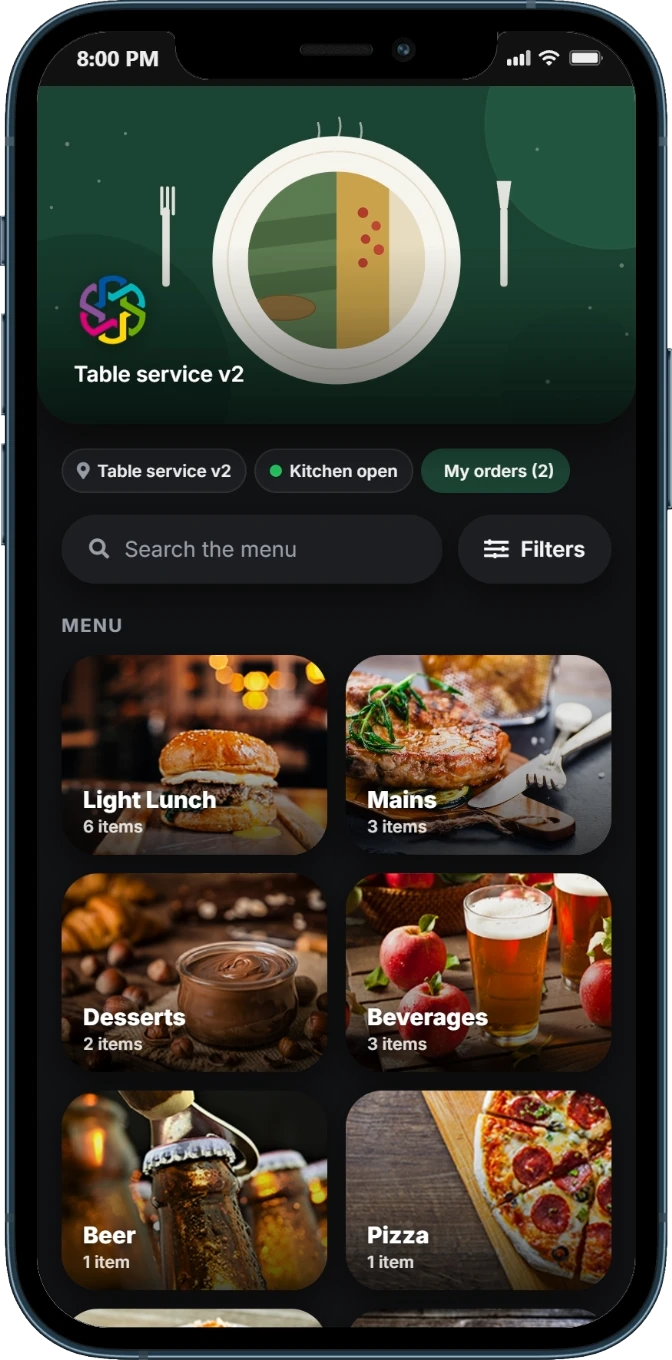
The new customer experience: guests scan the table QR code and order from redesigned, branded screens. Still no app to download, and available to every venue.
Photo Category Cards & Popular Items
Redesigned, fast ordering screens: category cards with photos and item counts, a popular-items section, and live search that filters as the guest types.
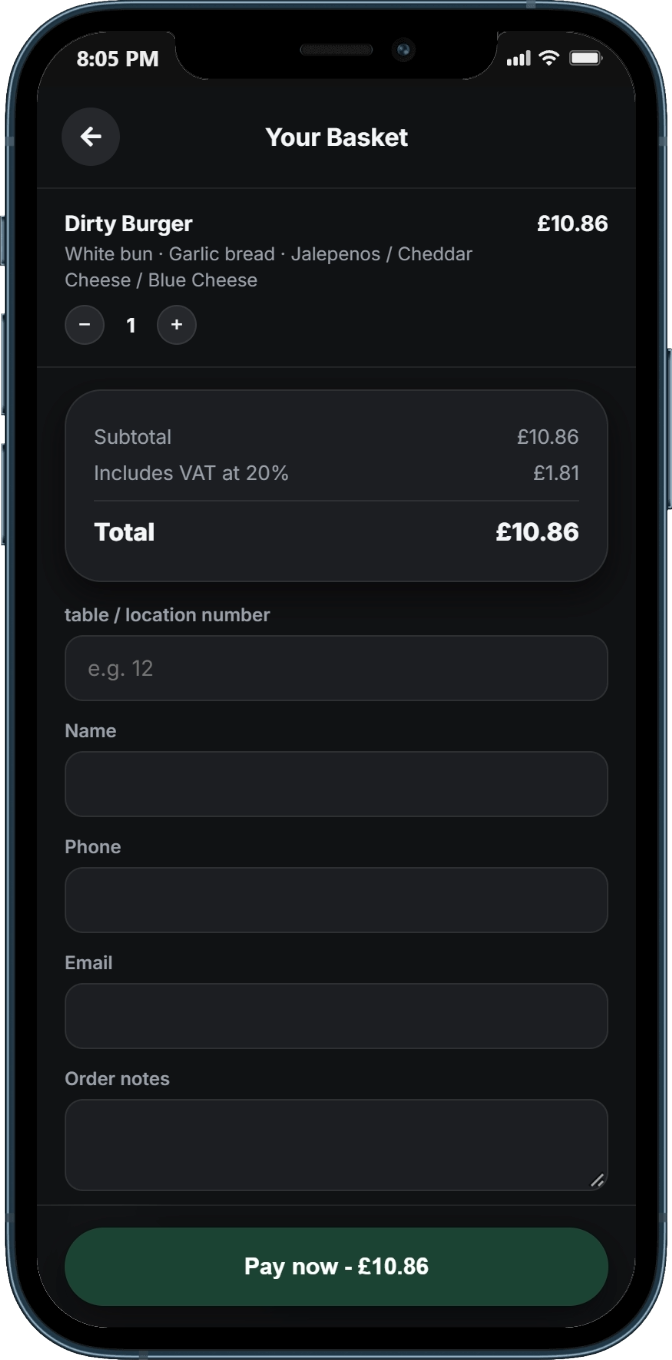
Basket and Checkout in One Step
A clear basket and a dedicated checkout page, so guests review what they have chosen and complete their order without hunting around.
Phone, Tablet, Desktop and Your Website
Built to work on phones and to look right on tablets and desktops, and when embedded in a venue's own website in an iframe.
Your Branding, Light or Dark
Set an accent colour and a background image (a company-wide default, or a different image for a particular menu), and choose a light or dark theme for each table or QR code.
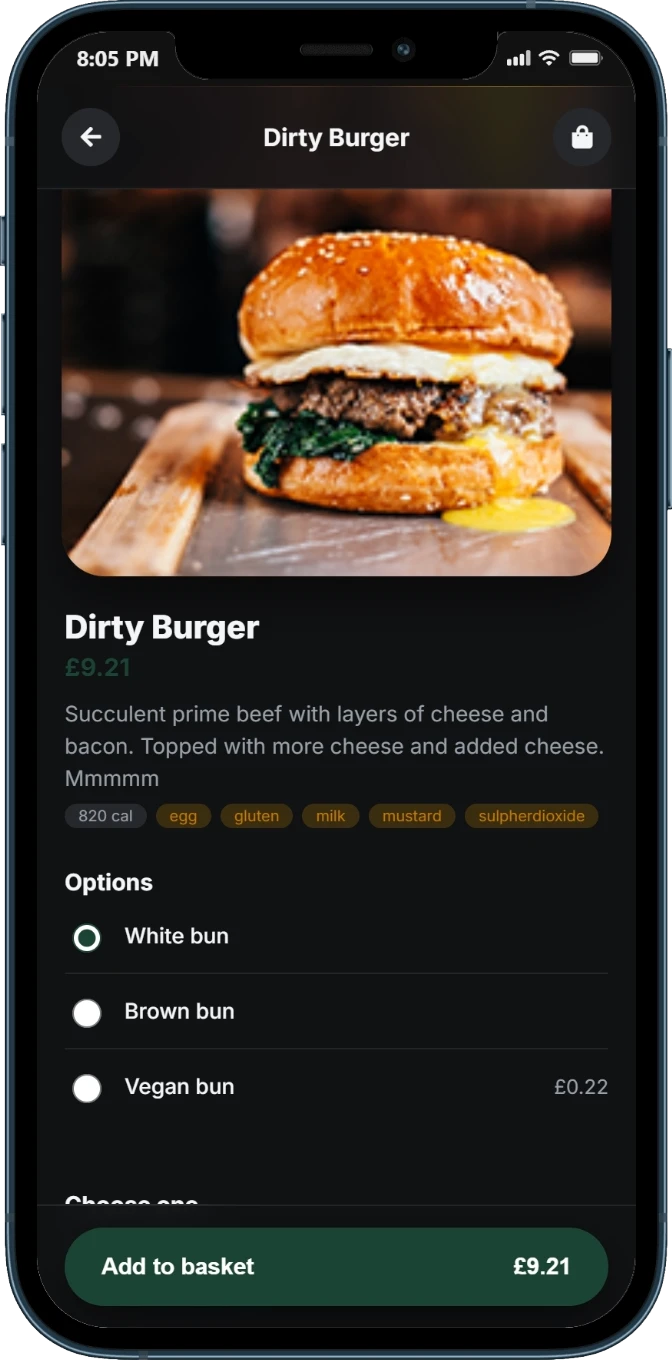
Allergen & Calorie Filters
On the home screen, guests tick the allergens to avoid and set a maximum calorie limit. Matching items are shown across the whole menu, not category by category.
Order Notes at Checkout
Customers can add notes, such as allergies or requests. They go on the kitchen docket and on the receipt email.
"My Orders" Status Page
Guests can follow their order on a status page, without asking staff or refreshing a confirmation screen.
Version 1 or 2, Table by Table
Available to every venue. When you generate a table's QR code, choose v1 or v2 for that table, and switch whenever you like.

Payments on v2
Pay at the Till, Pay Now, or Both: Per Table
The venue decides how each table takes payment.
Pay at the Till
The guest orders from their phone and pays when they settle up at the till. These orders show clearly as "payment required" in the order email.
Pay Now, Online
The guest pays by card online. They are taken to the secure hosted payment page of Trust Payments or Musqet, then returned to their order status page.
Or Offer Both
Each table is set by the venue: pay at the till, pay now, or both, so a bar counter, a restaurant floor and a room-service menu can each work the way they should.
For online payment on v2, the pay-now option currently uses the hosted payment pages of Trust Payments or Musqet only. The original ordering flow continues to support the eight integrated gateways listed further down this page.
Receipts & Kitchen Printing
Receipts Guests Keep, Dockets Your Team Needs
A Branded HTML Receipt
Customers who enter an email address get a branded receipt: your logo, order number, ready time, an itemised table, a clear PAID, PAYMENT DUE or charged-to-room banner, their notes, and your venue contact details. The venue gets a copy too.
Separate Kitchen and Bar Dockets
With Cloud Printing, food and drink dockets can go to separate kitchen and bar printers, so each team sees only what it needs to make.
For Your Team
The Order Board: Remove Orders and Move Them to a Tab
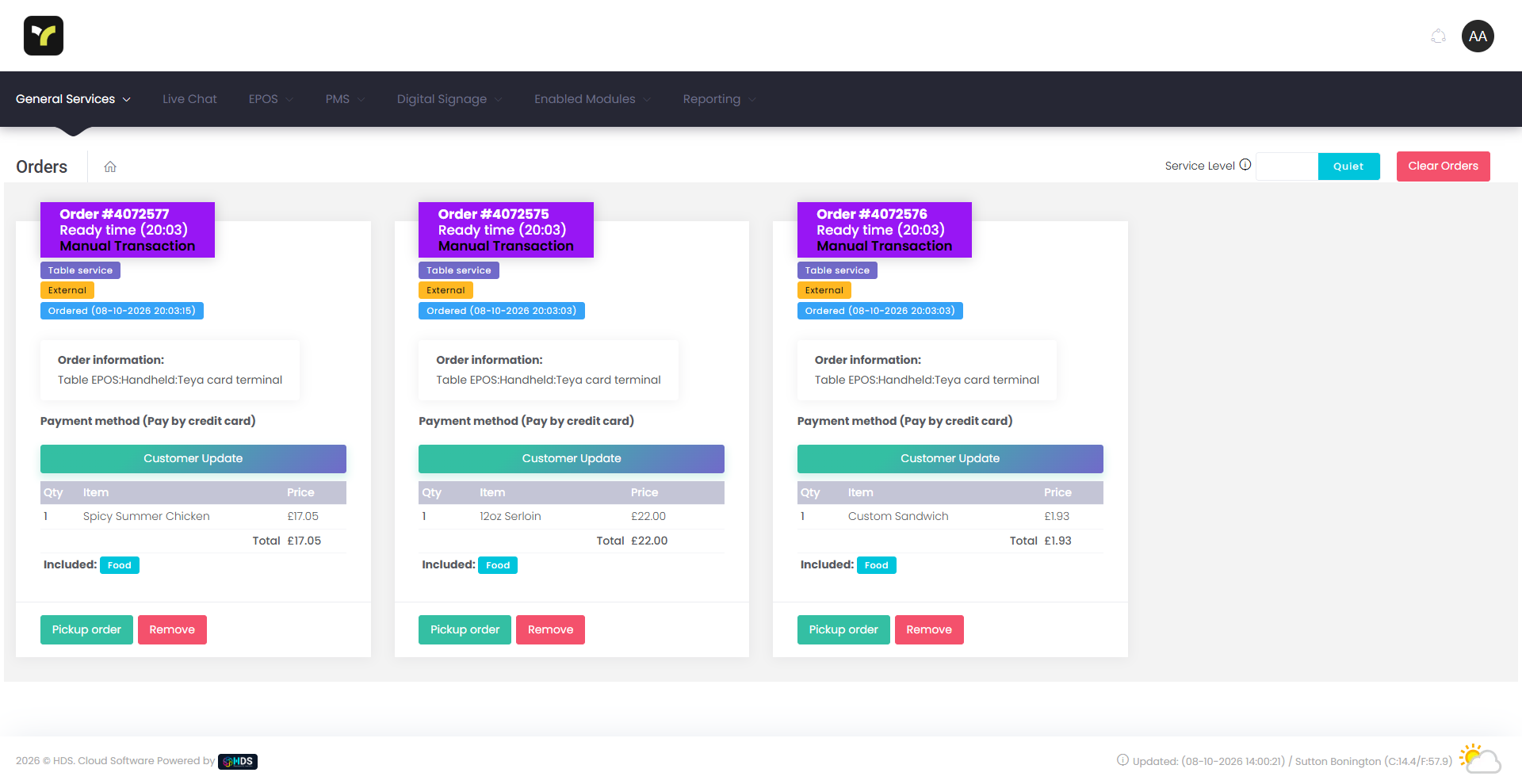
Two controls for staff on the order board, both protected by a manager code or PIN and both leaving a record.
Remove an Order, With a Record
Staff enter a manager code (or the manager PIN), choose a reason, and every removal is recorded for reporting. Only orders that have not been paid for can be removed.
Move an Unpaid Order to a Tab
An unpaid mobile order (pay at till) can be moved onto an open EPOS tab. Staff pick the open tab, enter the manager PIN and confirm. The items are added to the tab without being sent to the kitchen again, stock is kept right, and a full record of the move is kept.
The Guest Is Told
When an order is moved to a tab, the customer's phone status page tells them their order has been added to their tab.
Scan-to-Order, Built for Real Service
One QR Code. A Whole Ordering Journey.
From the scan to the plate arriving, every step happens on the guest's own phone.
apps for a guest to install — the QR code opens straight into a browser page tied to their table.
integrated payment gateways, so checkout uses whichever provider a venue already has configured.
selectable menu list layouts, switchable per venue to suit how the menu is best browsed.
is the starting price for mobile ordering as an add-on to the base HDS Cloud Apps platform.
The Guest Journey
From Scan to Order Collected
Five steps, entirely on the guest's own phone, from the first scan to the order in hand.
Scan
The table's QR code opens its own ordering page directly in the phone's browser.
Browse & Filter
The assigned menu loads, filterable instantly for allergens and dietary needs.
Build the Order
Items, options and upgrades are added, with container charges applied automatically.
Pay
Checkout hands off to whichever payment gateway the venue has configured.
Track Live
A status page follows the order through to ready and collected, in real time.
All five steps happen on a device the guest already has in their hand and already knows how to use — there's no separate sign-up, no app-store detour, and nothing to delete afterwards. A first-time visitor and a regular go through exactly the same journey.
Why Venues Switch
Traditional Table Service vs. QR Ordering
The same order, the same kitchen — but a very different guest experience getting there.
| Aspect | Traditional Service | QR Ordering |
|---|---|---|
| Getting the menu | Wait for a physical menu or a free member of staff | Opens instantly on scan — no app or account needed |
| Placing an order | Flag down a waiter and wait to be noticed | Order directly from the table, any time within opening hours |
| Dietary needs | Ask a member of staff to check each item | Filter the whole menu by allergen or diet instantly |
| Paying | Wait for the bill, then wait for the card machine | Pay from the phone the moment the order's placed |
| Order status | Ask staff, or simply wait and hope | Live status page — accepted, prepping, ready, collected |
| Need something before ordering | Try to catch someone's eye across the room | One-tap call-for-service button |
What's Actually Included
Built for a Genuinely Busy Service
Not just a digital menu — the parts that make ordering by phone work at real volume.
Dietary & Allergen Filtering
A real filter panel, built from the venue's own recorded allergens plus Vegan, Vegetarian and Gluten-free toggles — applied instantly across the whole menu, not item by item.
Container & Packaging Charges
Added automatically the moment an item that carries one is added to the basket, and removed again if it's taken back out — no manual till adjustment needed.
Live Order Status & Messaging
A dedicated status page tracks each order — accepted and prepping, ready, collected — in real time, with a two-way message thread back to the venue.
One-Tap Call For Service
A "Would you like service?" button lets a guest flag staff before they've even ordered, with a live confirmation the moment it's accepted.
Two Selectable List Layouts
Choose the menu-browsing layout that suits your venue best, switchable at platform level — both filter and order against the exact same live menu.
None of this is bolted on around a basic digital menu — the allergen filter reads from the same allergen records your kitchen already keeps, the container charge logic runs against the same item catalogue as your till, and the status page and call-for-service button both write straight into the same order and messaging tables the rest of the platform uses. It's one ordering engine with a phone-sized entry point, not a separate product to keep in sync.
How It Actually Works Behind the Scenes
How Every Table Gets Its Own Menu
A closer look at what happens between a guest scanning a code and the right menu appearing.
Enabled From One Admin Screen
Staff turn on a table's QR code from a single management screen, which prints a code linking straight to that table's own ordering page — no separate QR tool required.
Tables Grouped Into Menu Areas
Tables are grouped into menu areas, so a hotel can run a different menu on room-service tables than on its restaurant floor, from the exact same platform.
Opening Hours & Capacity Checked Automatically
Kitchen, bar and breakfast opening-hours windows, plus a live order-capacity cap, are checked before a table is allowed to order — a closed kitchen shows a clear notice instead of accepting an order it can't fulfil.
On-Site Ordering Controls
Ordering can be restricted to guests connected to the venue's own Wi-Fi, and larger venues can ask for a table or room number to confirm exactly where an order should go.
This is also why a hotel can run mobile ordering across genuinely different contexts from one setup: a poolside table, a bedroom on room service, and a restaurant floor can each be assigned to their own menu area, with their own opening hours and capacity limits, while every one of them still reports into the same live order queue and the same reporting your team already uses.
Payments
Whichever Gateway You Already Use
On the original ordering flow, checkout hands off to whichever of eight integrated payment gateways is already configured on your platform — one less system to manage. (Mobile ordering v2 pay-now currently uses Trust Payments or Musqet.)
Checkout only ever shows a guest the gateway your venue has actually configured — there's no separate mobile-ordering payment setup to maintain alongside your till. On the original ordering flow, payment is taken from the phone before the order reaches the kitchen or bar, so every order arriving in the queue is already paid for. With v2, tables set to pay at the till place the order first and show as payment required.
Where We Operate
Mobile Ordering Across the UK, Ireland, Malta, Spain & Gibraltar
The same QR ordering engine, the same payment gateways and live status tracking, wherever your business trades.
United Kingdom
Our home market, with local on-site engineers and 24/7/365 support alongside the full ordering platform.
View UK EPOS ›Ireland
Full coverage across Dublin, Cork, Galway and every HDS-served Irish city, with the same ordering engine.
View Ireland EPOS ›Malta
QR ordering built for Malta's dense, high-volume terraces and beach clubs during peak season.
View Malta EPOS ›Spain
Served through our partner network, with the same QR ordering engine and payment gateways available.
View Spain EPOS ›Gibraltar
A compact market where fast, contactless ordering genuinely matters during peak trade.
View Gibraltar EPOS ›One Ordering Engine, Every Sector
Configured for How Guests Actually Order
QR ordering isn't specific to one type of venue — it runs across every sector HDS Cloud Apps serves.
Restaurants
Table-side QR ordering that fires straight to the kitchen, with dietary filtering built in.
View Restaurant EPOS ›Hotels
Room-service ordering assigned to its own menu area, distinct from the restaurant floor.
View Hotel EPOS ›Bars & Pubs
Order and pay from a beer garden or terrace table without ever queuing at the bar.
View Bar EPOS ›Cafes
Fast counter-free ordering for busy daytime trade, with live status so guests know when to collect.
View Cafe EPOS ›Getting Started
Live on Every Table Within Days
Book a Demo
See the guest journey end to end — scan, filter, order and pay — configured live, for a menu like yours.
Assign Menus & Print Codes
We help you group your tables into menu areas, set opening hours and capacity, and print your table QR codes.
Go Live With 24/7 Support
HDS provides around-the-clock support from day one, with menu and layout changes managed remotely in real time.
Frequently Asked Questions
Mobile Ordering Questions Answered
Scanning & Access
How does a customer start an order?
They scan the QR code on their table, which opens that table's own ordering page directly in their phone's browser — no app to download and no account required.
Does it work with NFC tags as well as QR codes?
The system is built around QR codes, each encoding a unique web link to a table's ordering page. There's no dedicated NFC feature today — but because the QR simply encodes a standard link, an NFC tag programmed with that same link would open the identical page.
Can ordering be restricted to guests who are actually on-site?
Yes. Ordering can be restricted to guests connected to the venue's own Wi-Fi network, and larger venues can also ask a customer to confirm their table or room number so an order reaches the right place, even on a first scan.
Menu & Ordering
Can every table run a different menu?
Yes. Tables are grouped into menu areas, so — for example — a hotel can run a different menu on room-service tables to the one on its restaurant floor, from the exact same platform and admin screen.
Can customers filter the menu for allergies or dietary needs?
Yes. A filter panel covers the whole menu, built from the venue's own recorded allergens plus Vegan, Vegetarian and Gluten-free toggles, applied instantly to every category.
Can multiple guests at one table share a single basket?
Not currently. Each scan starts its own individual order and cart. Multiple guests at the same table can each scan and order independently, but there's no shared-basket or automatic bill-splitting feature today.
Payments
Which payment providers does mobile ordering support?
Eight integrated payment gateways — Stripe, WorldPay, Trust Payments, DNA Payments, TakePayments, NMI, WPM and Musqet — whichever a venue already has configured elsewhere on the platform.
Does the customer pay before or after the order is sent to the kitchen?
It depends on the version and on how the table is set up. On the original ordering flow, checkout takes payment from the customer's phone through the venue's configured gateway, and the order is only placed with the kitchen or bar once payment succeeds. With mobile ordering v2, the venue sets each table to pay at the till, pay now online, or both.
Is there an extra charge for packaging or takeaway containers?
Only where a venue has set a container charge on specific items. It's added automatically the moment a qualifying item is added to the cart, and removed again if that item is taken back out.
Order Tracking & Service
Can a customer track their order after paying?
Yes. A live order-status page shows accepted and prepping, ready, and collected in real time, alongside any messages the venue sends about the order.
Can a customer call a member of staff without placing an order?
Yes. A one-tap call-for-service button on the ordering page notifies staff immediately, with a live on-screen confirmation once a team member has accepted the request.
Is mobile ordering included in the base platform, or a paid add-on?
It's an add-on module, priced from £15 per month per site, on top of the base HDS Cloud Apps platform starting from £49 per month.
Mobile Ordering v2 & Order Board
What is mobile ordering v2?
It is the new customer-facing ordering experience. Guests scan a table QR code and order from redesigned, branded screens with category cards, popular items, live search, a basket and a dedicated checkout page, plus a status page to follow their order. There is no app to download, and it is available to every venue.
Can I choose between version 1 and version 2?
Yes. You choose v1 or v2 for each table when you generate its QR code, and you can switch at any time.
Can customers pay online on v2?
Yes. Each table can be set to pay at the till, pay now, or both. Pay now takes the customer to the secure hosted payment page of Trust Payments or Musqet and returns them to their order status page. Online payment on v2 is currently available through those two providers only.
Can customers add allergy notes or requests to an order?
Yes. Customers can add order notes at checkout. They appear on the kitchen docket and on the receipt email. Guests can also set allergen and maximum-calorie filters on the home screen to see matching items across the whole menu.
Can staff remove a mobile order from the order board?
Yes, for orders that have not been paid for. Staff enter a manager code (or the manager PIN), choose a reason, and the removal is recorded for reporting.
What does move to tab do?
An unpaid mobile order (pay at till) can be moved onto an open EPOS tab. Staff pick the open tab, enter the manager PIN and confirm. The items are added to the tab without being sent to the kitchen again, stock is kept right, a full record of the move is kept, and the customer's phone status page tells them their order has been added to their tab.
Ready to Put a QR Code on Every Table?
Book a free demo and see the full guest journey — scan, filter, order, pay and track — live, on a menu like yours. No obligation, no sales pressure.